
DIM (Destiny Item Manager) is an essential external tool for managing Destiny 2 items. Its “Loadout Optimizer” feature is particularly powerful, automatically finding the optimal armor stat combinations from your inventory.
Loadout Optimizer Overview
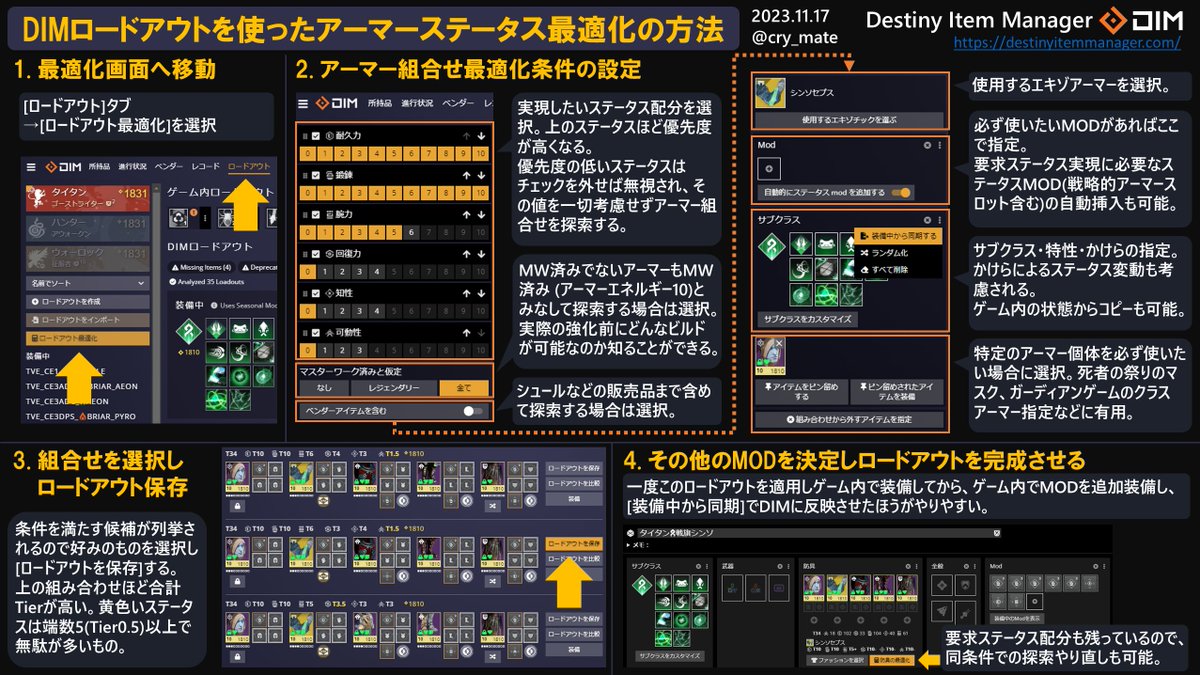
DIM’s Loadout Optimizer can automatically insert stat-boosting mods to meet your desired stat requirements. It offers almost the same functionality as D2ArmorPicker, but everything can be done within DIM.
Benefits:
- Can copy subclass settings directly from in-game
- Available in multiple languages
- Easy to re-optimize from existing DIM loadouts
Comparison with D2ArmorPicker
D2ArmorPicker has some UI differences like wasted stats overview and one-click triple 100 builds, but the benefit of having everything in DIM is significant.
Since combinations found in D2AP ultimately get registered in DIM anyway, doing it from the start in DIM allows for easier re-optimization.
The ability to easily re-optimize from DIM loadouts is huge. You need to redo optimizations when artifact discount mods change each season, and when you get good armor drops, you’ll want to see if they fit into your builds.
Optimization Tips
Only Check Required Stats
When using DIM’s optimizer, uncheck all stats except the 2-3 you actually need. If you check unnecessary stats like Intellect, the optimizer will try to boost those too, wasting mod energy.
If your required stats can be achieved with armor’s base stats alone, you won’t need any stat mods and can use all mod slots for other purposes.
Is Triple 100 Really Necessary?
According to Aegis, even for speedruns, double 100 stats are sufficient. Sacrificing fragments and useful mods for triple 100 provides no noticeable difference in actual combat.
For PvE, Resilience 100 or double 100 is plenty. Don’t rely on Harmonic mods—leave room for high-cost, non-matching elemental mods depending on your weapons.
Maximizing Two Stats Total
If you want to maximize the sum of two stats, just uncheck all other stats without adjusting the bars. The top build candidate will have the maximum combined total.
Specifying Specific Armor
Pinned Items
There’s no direct way to specify exotic class armor with specific perks, but you can use “Pinned Items” to force specific gear to be used. Pin the exotic class armor you want to use to get your desired build.
Assume Masterworked Options
The “Assume Masterworked” section has these options:
| Option | Effect |
|---|---|
| +Exotic | Assume exotics at Level 10 |
| +Artifice | Assume exotic Level 10 + exotic artifice slot unlocked |
Armor 3.0 Era (200 Stats Support)
DIM’s beta version now supports stat optimization up to 200. You can adjust minimum/maximum values for each stat using sliders.
Note that the damage bonus from stats over 100 is nearly meaningless for:
- Healing grenades
- Stasis turrets
- Void souls
These aren’t used for damage purposes.
Grapple melee damage scales with both Strength and Discipline, but if that’s your goal, prioritize Discipline 200 (+65%) over Strength 200 (+30%) since it has better scaling.
Loadout Management Tips
Prioritize Versatile Builds
Rather than keeping many loadouts optimized for specific encounters, save only versatile builds with broad applicability.
Don’t Register DPS Armor
Don’t create DIM builds for armor worn only during boss DPS (like Cuirass of the Falling Star). Instead, copy your ad-clear build and swap just the exotic and surge mods on the fly.
Reasons:
- Stats during DPS are nearly meaningless
- Accidentally switching to a build with different fragments/aspects will strip all your abilities
Handling Soon-to-Delete Items
If you run optimization with lots of soon-to-delete items in your inventory, builds using those items may rank high. But even restricting to kept items only drops total stats by about 5, which is totally fine.